Chers Lecteurs, I just had to come back to tell you about an awesome discovery. And yes, I will finish the Hong Kong story one day too. But first, this review.
I think I’ve settled on my home surveillance software and it’s called Xeoma. As part of my prepping, I had been thinking about setting up a surveillance system for quite a while; recently I decided to just start somewhere and build one up. So I got started.
Where to start?
I had an USB webcam lying around, so I mounted it in an inconspicuous spot where it covered the front of the house pretty well. So far so good, but what next? I needed some software. I figured I’d need to:
- capture video when something/someone is detected approaching the house
- record video files locally and send them offsite
- forward a live stream so I can view it remotely
- trigger on motion detection to reduce the data avalanche
- manage multiple cameras with separate configuration and policy settings
…and I wanted to do all this on a Macintosh. I looked around for a solution, first trying a few free webcam apps — that was fun at first but didn’t come close to addressing my laundry list. Next I looked at SecuritySpy, which seemed excellent and professional… but ouch, what a price tag: hundreds of dollars for a minimal system. (And it has some really obnoxious features in the trial version!)
Next I looked at a few other free or demo webcam apps, but again found them lacking.
Then I found Xeoma. Wow, those clever Russians! This software is reasonably priced ($20 and up) and seems to address all my needs:
- monitor multiple cameras
- motion detection with various configuration and masking options
- send to various destinations including files, FTP servers, webservers, etc.
- alarms, app launch, and various other filters and features
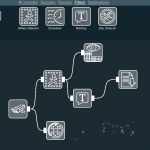
The drag-and-drop filter graph that configures your system is very intuitive and easy to use. For example, this graph routes a single camera to a motion detector, then on to the preview/archive module (the top path) and also through a timestamp filter and to a file output module. The raw camera output (not filtered by the motion detector) is also output using the web server module. The whole setup took less than a minute to do.
Sadly, the user interface and documentation is a bit challenged for English clarity. (Like the control labeled “file storage time”… is this how often to store files? How long to keep them? When they are updated? It is not clear.) But these problems are very minor, and overall I had no problem figuring it out.
I have ordered an infrared camera, and am looking forward to building out my Xeoma-based home security system. If you want to check out Xeoma yourself, download the free trial version (Win, Mac, or Linux) at:
http://felenasoft.com/xeoma/en/download/
I’m going to  get a bunch of cheap USB and IP cameras, and this software is going to let me set up a really decent system for super cheap! I love this thing. Earlier today I came home, went into the study, and then watched myself come home! Good fun. Now, back to playing with my Xeoma system.



0 Responses
Stay in touch with the conversation, subscribe to the RSS feed for comments on this post.